Camera specifications
General | |
Model | allPIXA neo 4k 10GigE Mono allPIXA neo 4k 10GigE Color |
Product code | CP000660-04k-77-M1-A1 CP000660-04k-77-M1-A1 |
Availability | Available |
Sensor | |
Sensor type | Line scan 2D |
Chroma | Mono, Color + Mono |
Spectrum | Visible |
Spectral range | 400 nm – 960 nm |
Resolution | 4096 × 1 4096 × 4 |
Sensor architecture | CMOS (SI) |
Sensor Size / Image circle | |
Pixel size | 7 µm × 7 µm |
Pixel formats / Data format / Output color space | |
Data format | 3 × 8/10/12 Bit color or 1 × 8/10/12 Bit mono or 4 × 8/10/12 RGB + Mono |
Sensor bit depth (ADC) | 10-bit |
Video output | RJ45 (10GBase-T) |
Imaging performance | |
Quantum efficiency (529 nm) | |
Quantum efficiency (850 nm) | |
Full well capacity | |
Timing and gain | |
Max. line rate (single-line) | 250 kHz |
Max. line rate (tri-linear) | 90 kHz |
Max. line rate (quad-linear) | 250 kHz |
Exposure time | 10 ke- and 40 ke- |
Gain | 1 to 5 |
I/O’s and Power | |
Non-isolated lines (I/O’s) | |
Specific non-isolated lines (I/O’s) | |
Opto-isolated lines(I/O’s) | |
Power supply | PoE or digital I/O port |
Power consumption | External: 12 W |
Operating conditions | |
Operating temperature (housing) | 0 °C – 60 °C; 32 °F – 140 °F |
Mechanical properties | |
Body dimenstions (L x W x H) | 62 mm × 62 mm × 62 mm |
Filter / Protection glass | |
IP class (ingress protection) | IP50 |
Shock and vibration tests | |
Lens mount | M42 × 1 mm / F-Mount, TFL |
Wight / Mass | 0,35 kg |
On-board memory on FPGA | |
Image buffer (RMA) | |
Non-volatile memory (Flash) | |
User data memory | |
Interface for image transfer | |
Digital interface / Video output | Single 10 GigE |
Interface connector | RJ45 (10GBase-T) |
Vision standard | GigE Vision 2.0 compliant |
Temperature during transport and storage | -20 °C – +85 °C; -4 °F – +185 °F |
Certifications | CE, RoHS |
General ambient conditions | |
Transport | IEC 721-3-3:IE33 |
Operation | IEC 721-3-3:IE21 |
Storage | IEC 721-3-3:IE11 |
Camera features
Image control | |
Binning | Digital |
Color transformation | Ye |
Brightness and Contrast | Yes |
Exposure modes | Manual |
PRNU | Yes |
DSNU | Yes |
Gain modes | Manual Auto |
Gamma | Yes |
LUT (look-up table) | Yes |
Mirror Images | Yes |
ROI (region of interest) | Yes |
White balance mode | Manual Auto |
Camera control | |
Acquisition Line Rate | Yes |
Action commands (Trigger over CXP) | Yes |
Temprature monitoring | Yes |
Trigger mods / sync | Freerun Internal Software trigger External trigger Line trgger Frame trigger Encoder |
User sets | Yes |
Master Slave | Yes |
Flash (Multi field imaging) | Yes |
Sensor tempreature control | |
Temperature specific events | Yes |
Temprature status indicator | Yes |
Line scan sensor
Sensor pixel arrangement
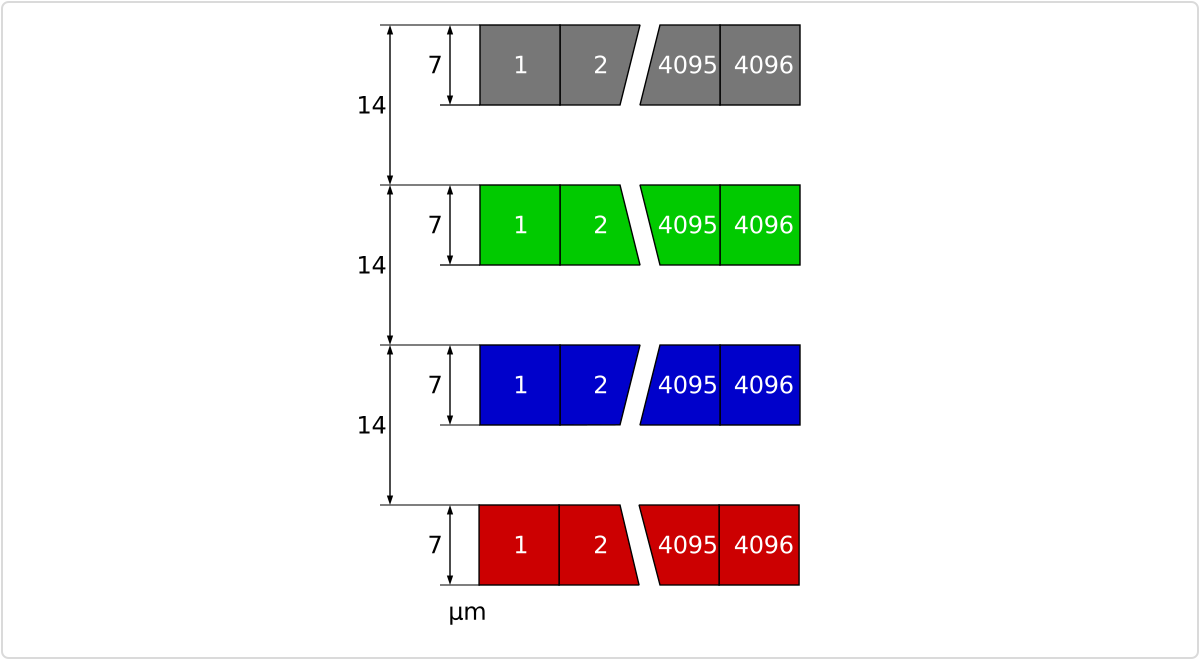 Sensor line spacing and pixel arrangement of the 4k sensor
Spectral sensitivity
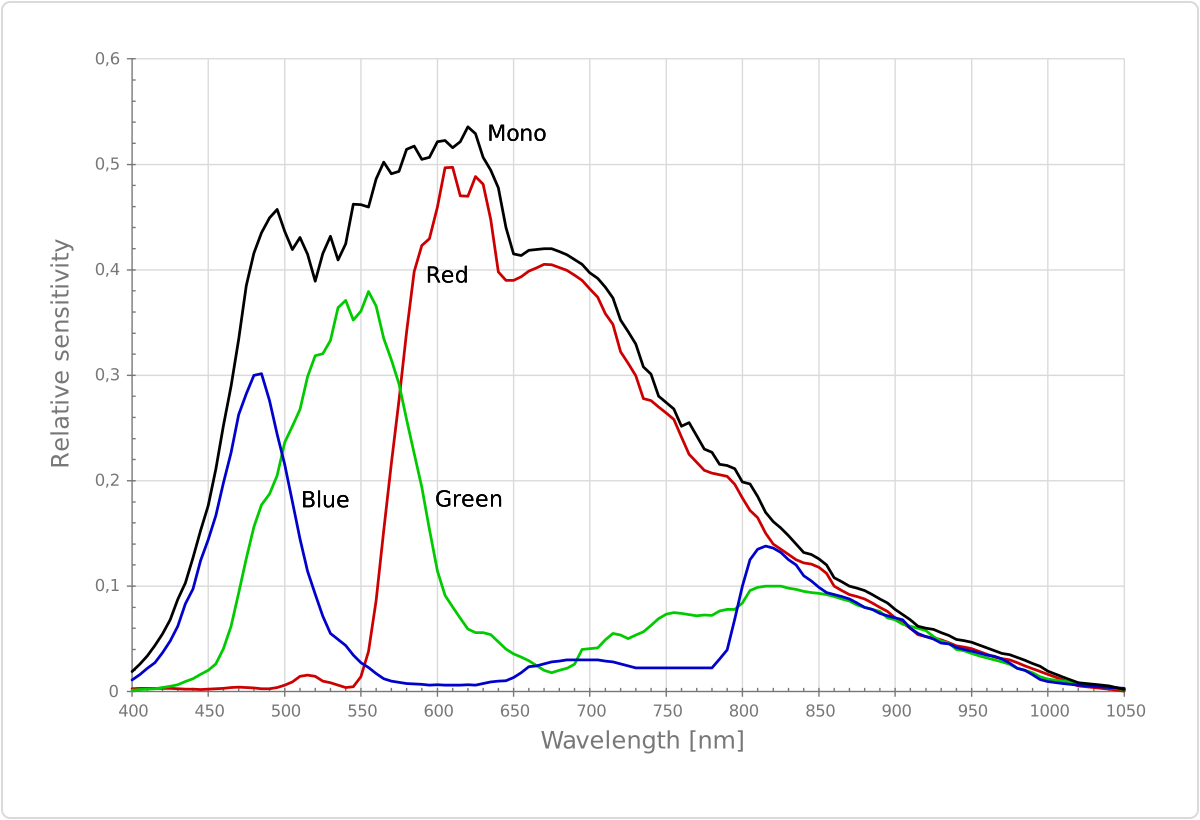 Measured relative sensitivity of the color and the mono sensor
Sensor alignment and orientation
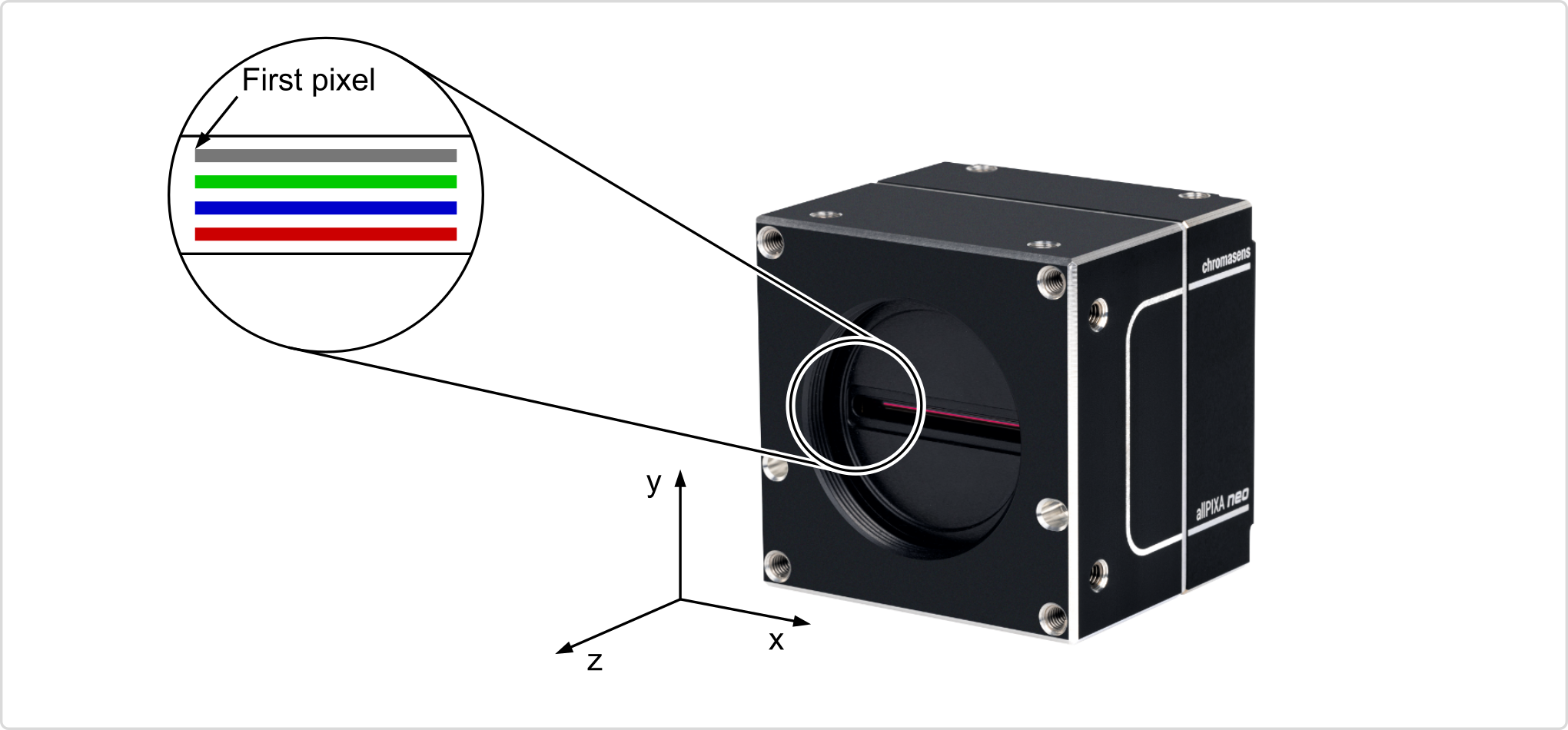 Alignment and orientation of the 4k sensor: Color + Mono
Mechanical dimensions
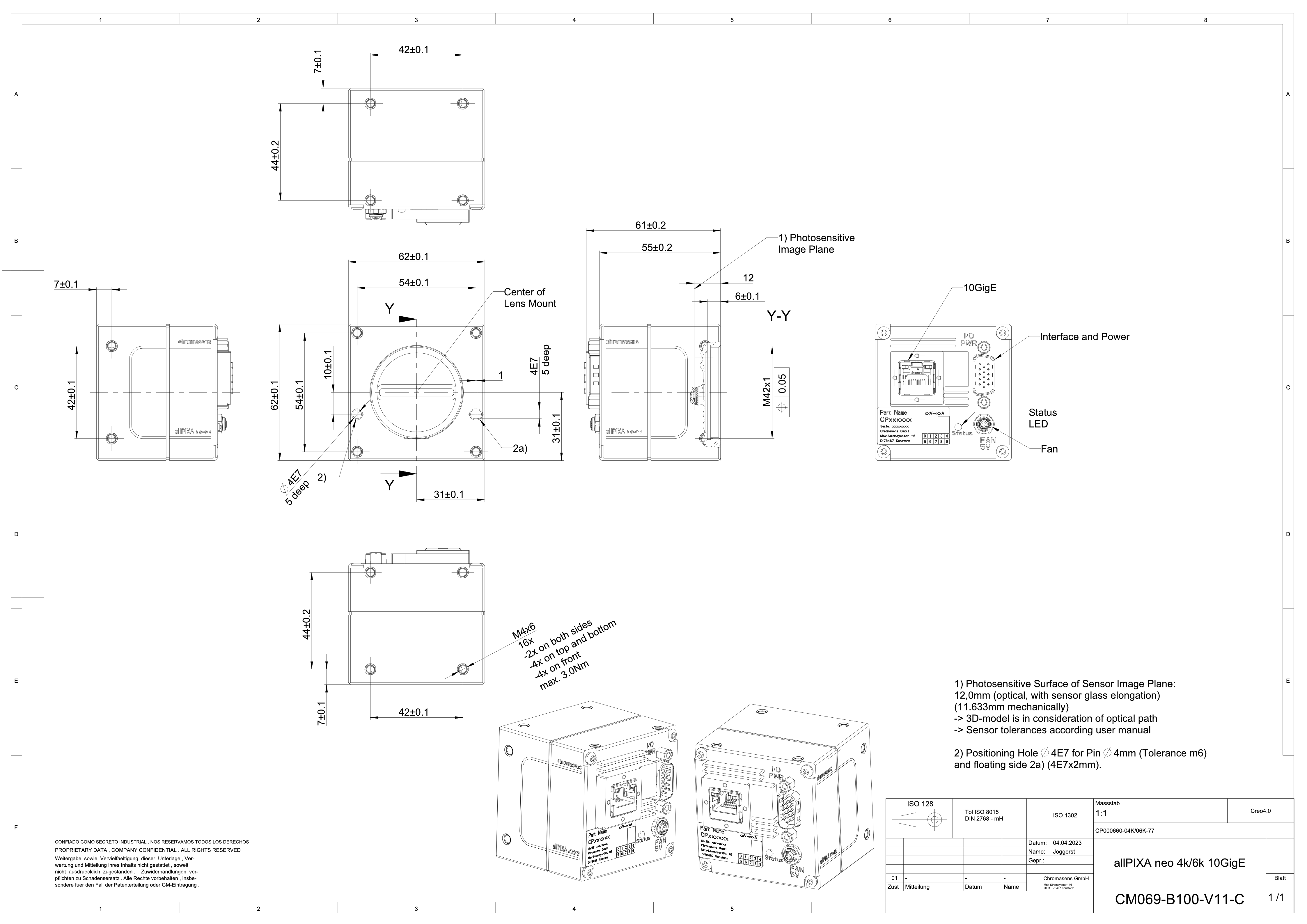 Dimensional drawing of the allPIXA neo 4k/6k 10GigE
Interface specification
.svg) | |||
| 1 | Video output port 10GigE (RJ45) and power supply | 2 | Digital I/O port and power supply |
| 3 | Status LED | 4 | Connector for additional fan |
Line rate
| Configuration | Line rate |
|---|---|
| Mono (8 bit) | 249.7 kHz |
| RGB (8 bit) | 88.4 kHz |
| RGB + Mono (8 bit) (NIR) | 69.9 kHz |
Power supply
You can either use Power over Ethernet (PoE) or the power supply of the external digital I/O port.
Digital I/O port
The following connector is required for the digital I/O port:
- 15 pin HD D-Sub (female)
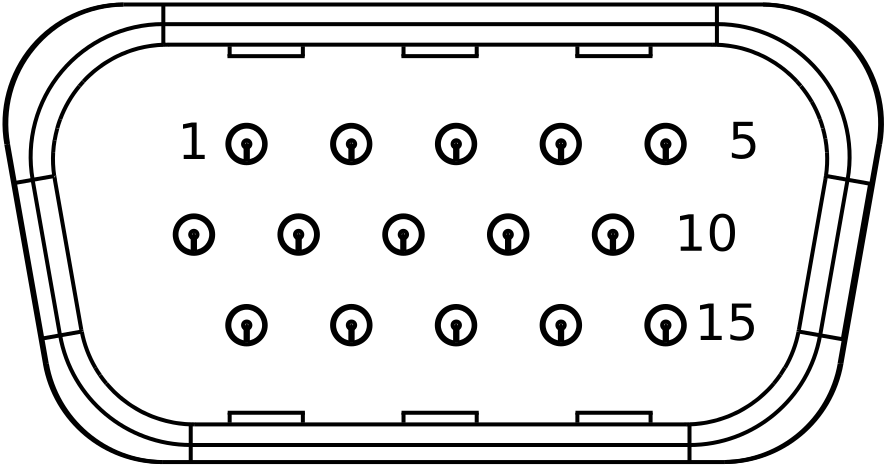 Pin allocation D-Sub connector (male) of the camera
You can configure the digital I/O port as RS422 or as single-ended input or output. It is also possible to configure one output as RS422 and the other output as single-ended.
RS422 configuration
| Pin | Line definition for RS422 configuration | Signal RS422 | Configuration proposal |
|---|---|---|---|
| 1 | Line 1 | In1+ | Encoder Source A, Line Start |
| 2 | In1– | Encoder Source A\, Line Start\ | |
| 3 | Line 2 | In2+ | Encoder Source B, Fame Start, Frame Active |
| 4 | In2– | Encoder Source B\, Fame Start\, Frame Active\ | |
| 5 | GND (Signals) | Signals Ground | |
| 6 | Line 3 | In3+/Out3+ | Encoder Source A, Fame Start, Frame Active, Line Start, User Output3+ |
| 7 | In3–/Out3– | Encoder Source A\, Fame Start\, Frame Active\, Line Start\, User Output3- | |
| 8 | Line 4 | In4+/Out4+ | Encoder Source A, Fame Start, Frame Active, Line Start, User Output4+, MS-In+ |
| 9 | In4–/Out4– | Encoder Source A\, Fame Start\, Frame Active\, Line Start\, User Output4-, MS-In- | |
| 10 | GND (PWR) | Camera Power Ground | |
| 11 | Line 5 | Out5+ | User Output5+, MS-Out+ |
| 12 | Out5– | User Output5-, MS-Out- | |
| 13 | Line 6 | Out6+ | User Output6+ |
| 14 | User Output6- | ||
| 15 | Vcc (PWR) | Camera Power DC +12 V – +24 V |
Single-Ended (SE) configuration
The input threshold voltage can be configured globally to 3.3 V, 5 V, 12 V and 24 V. The Maximum input voltage is 28 V. The set voltage level is then active for all single ended inputs and outputs.
| Pin | Line definition for Single-Ended configuration | Signal Single-Ended | Configuration proposal |
|---|---|---|---|
| 1 | Line 1 | In1 (3.3 V, 5 V, 12 V, 24 V) | Encoder Source A, Line Start |
| 2 | -- | -- | -- |
| 3 | Line 2 | In2 (3.3 V, 5 V, 12 V, 24 V) | Encoder Source B, Fame Start, Frame Active |
| 4 | -- | -- | -- |
| 5 | GND (Signals) | Signals Ground | |
| 6 | Line 3 | In3 (3.3 V, 5 V, 12 V, 24 V) Out3 (3.3 V) | Encoder Source A, Fame Start, Frame Active, Line Start, User Output3+ |
| 7 | -- | -- | -- |
| 8 | Line 4 | In4 (3.3 V, 5 V, 12 V,24 V) Out4 (3.3 V) | Encoder Source A, Fame Start, Frame Active, Line Start, User Output4+ |
| 9 | -- | -- | -- |
| 10 | GND (PWR) | Camera Power Ground | |
| 11 | Line 5 | In5 (3.3 V) Out5 (3.3 V) | LED Flash Out 3, User Output5 |
| 12 | Line 7 | In7 (3.3 V) Out7 (3.3 V) | LED Flash Out 2, User Output7 |
| 13 | Line 6 | In6 (3.3 V) Out6 (3.3 V) | LED Flash Out 0, User Output6 |
| 14 | Line 8 | In8 (3.3 V) Out8 (3.3 V) | LED Flash Out 1, User Output8 |
| 15 | Vcc (PWR) | Camera Power DC +12 V – +24 V |
LED status indicator
| Color code | Behavior | Description |
|---|---|---|
 | Off | No power supply or the input voltage is out of range. |
 | Blue continuous | The device is OK and provides image data. Between image gaps the LED is off. |
 | Green continuous | The device is in power-up mode. |
 | Green blinking | The device is OK and ready. |
 | Yellow continuous | Warning-state: The device is operational. |
 | Red continuous | Error-state: The device is not operational. |